
One of the most important features of localization components is their ability to create multi-language applications, empowering users to manage translations. This includes updating localizations and even adding new languages without the need for recompiling the application. However, achieving this is easier than it may initially appear, especially when leveraging TsiLang localization components for developing multilingual software.
Let’s describe the solution for this problem using sample project MastApp from the Demos Delphi sub-folder.
Translating the project
We won’t delve into the detailed description of the translation process since we assume you are already familiar with this aspect of TsiLang Components Suite. Instead, we will briefly mention the components utilized for translation.
We use one TsiLangDispatcher; one TsiLang and TsiLangLinked on all other project forms.
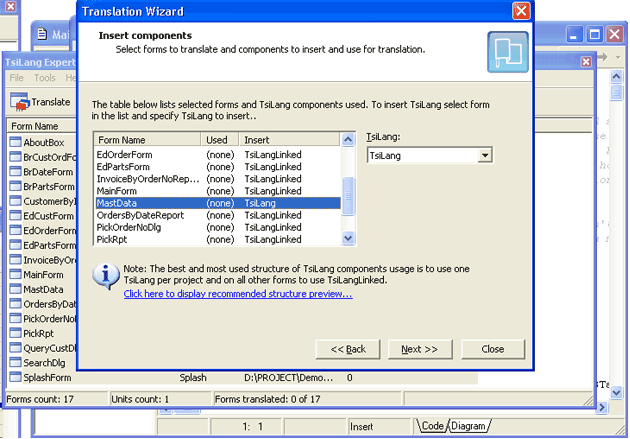
MastData unit is auto-created and used by all the project forms. So we place TsiLang and TsiLangDispatcher onto it.
Creating a translations file
We have the option to generate an external translations file, either with translations provided or with just English terms. To accomplish this, we can utilize the “Save to File | Project” command available in the TsiLang Expert commands panel (accessible under the Tools menu in the IDE). It is recommended to use SIB files for storing translations, as they offer faster performance compared to SIL files. However, SIL files can also be used since they store data in a simple ASCII format, allowing easy editing with any text editor.
Using an external translations file and dynamic update of available languages
There are two approaches to accomplish this:
Define the file name in the
FileNameproperty ofTsiLangDispatcher. By doing so, the dispatcher will automatically check if the translation file is available based on the specified file name and load it into all project forms.Alternatively, you can manually check for the existence of the translation file at a specified location in your code and then load it. Here is a sample code snippet demonstrating this approach:
procedure TMastData.DataModuleCreate(Sender: TObject);
var
  sOurSibFile: string;
begin
 // determine the file name
  sOurSibFile := ExtractFilePath(Application.ExeName) + 'TheNameOfYourFile.sib';
 // checking the existence of file
  if FileExists(sOurSibFile) then
  begin
  // set the property value
  // this will automatically load forms created later
    siLangDispatcher1.FileName := sOurSibFile;
  // load translations into already created forms
    siLangDispatcher1.LoadAllFromFile(sOurSibFile);
  end;
end;
Choose the approach that best suits your requirements and integrate it into your project accordingly.
Dynamically display the list of the available languages
OnShow event of the main form: // changing active language upon menu item click
procedure TMainForm.LanguageMenuItemClick(Sender: TObject);
begin
MastData.siLangDispatcher1.ActiveLanguage := TMenuItem(Sender).Tag;
TMenuItem(Sender).Checked := True;
end;
procedure TMainForm.FormShow(Sender: TObject);
var
MenuItem: TMenuItem;
I: Integer;
begin
for I := 1 to MastData.siLangDispatcher1.NumOfLanguages do
begin
MenuItem := TMenuItem.Create(Self);
// set Caption
MenuItem.Caption := MastData.siLangDispatcher1.LangNames[I - 1];
// set Tag property for easier language switching
MenuItem.Tag := I;
MenuItem.RadioItem := True;
// display current language
MenuItem.Checked := I = MastData.siLangDispatcher1.ActiveLanguage;
// set event handler
MenuItem.OnClick := LanguageMenuItemClick;
// add menu item
Language1.Add(MenuItem);
end;
end;Please note: the code for updating and displaying the language must be executed after the translations file is loaded.
Conclusion
Run the project, and “that’s all”! The task, which may seem complicated at first glance, can be easily solved in just a few minutes using TsiLang Components Suite. With this powerful tool, your users will be able to translate your applications without the need for recompilation or your assistance. Additionally, you can provide them with the SIL Editor for editing SIL/SIB files, which can be downloaded from our dedicated download page.
It’s worth noting that our own applications follow the same approach to support user-managed translations. The SIL Editor, Dictionary Manager, and Resource Builder all utilize this technique effectively.
You can download this article in PDF format here: creating_multilanguage_applications_translated_by_users.pdf.