
Overview
TsiLang Components Suite is a localization framework for RAD Studio, Delphi and C++Builder. Add components to your forms, keep translations together and switch the language of your whole application.
Your application, connected
Options form
Main form
About form
TsiLangDispatcherOne language change. Every form follows.
siLangDispatcher1.ActiveLanguage := 2;
English
Deutsch
Español
How it works
01
Run TsiLang Expert to add components to forms and data modules. Scan source code for strings that need translation.
02
Work in the IDE, or share files with a translator using the free SIL Editor. Use AI and Translation Memory, then check the results.
03
Keep translations in the application or in external files. A single dispatcher assignment changes all connected forms at runtime.
What gets localized
Captions, hints, display labels, combo-box items, memo lines and other string properties.
Hard-coded strings, resource strings and localized counterparts of standard dialogs.
Extended Translations let non-string properties such as size, position and alignment vary with language.
Inside the suite
TsiLang stores form translations. TsiLangLinked shares common translations between forms. TsiLangDispatcher coordinates the application language.
TsiLang Expert, Translation Wizard and Translation Editor integrate localization into your existing project. Translation Memory reuses earlier translations, while the Expert’s validation and quality checks help find missing translations and other localization issues before release. Resource Strings Wizard imports resource strings, including from units without source.
The freely redistributable SIL Editor and Dictionary Manager support translation outside the IDE. silcli validates files in automated workflows.
AI drafts. You decide.
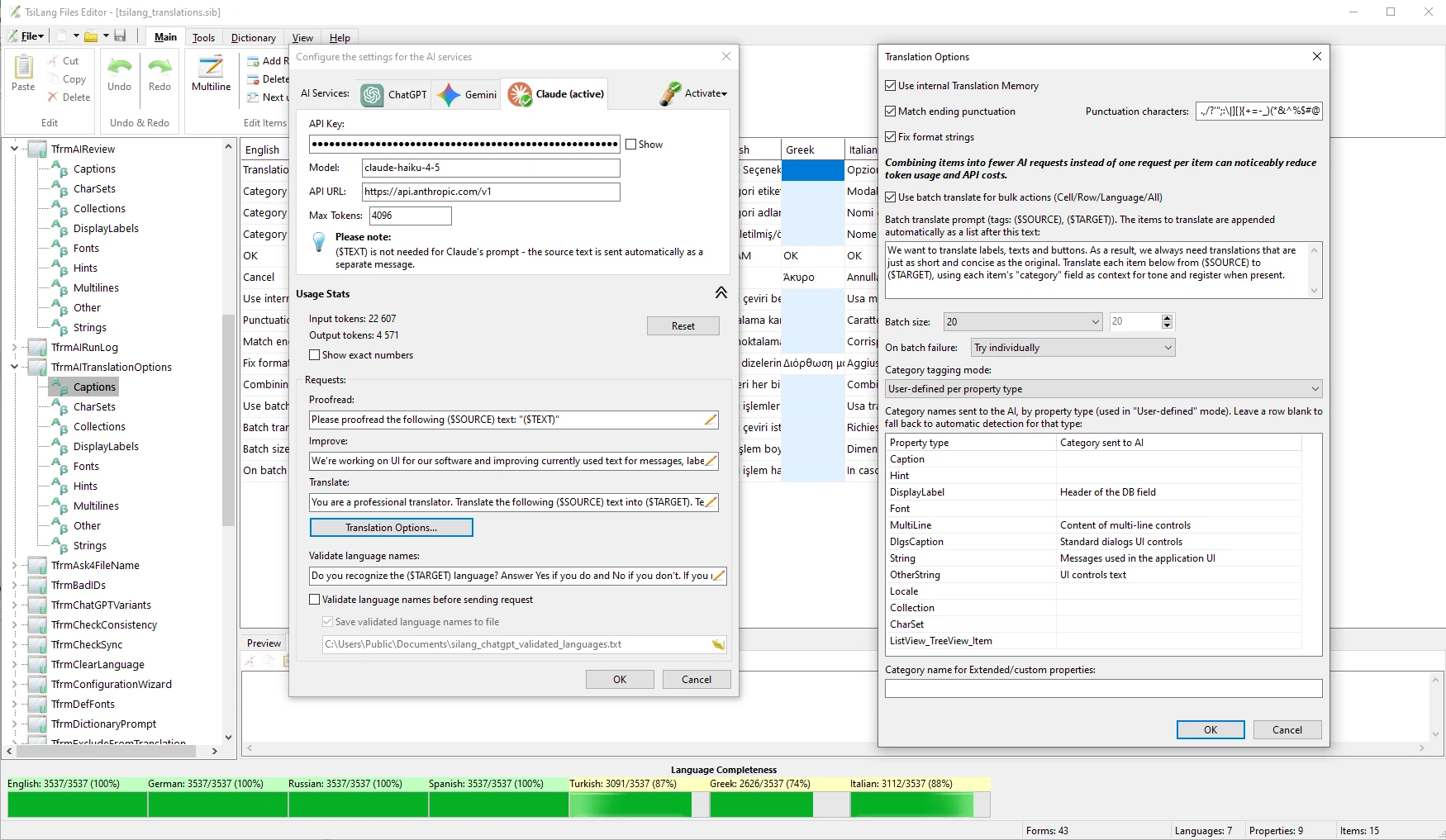
Use built-in AI translation with ChatGPT, Gemini or Claude. Categories tell the provider how each string is used; Translation Memory helps reuse earlier work.
AI coding assistants work on exported copies through the MCP server. Review the result before loading it into your forms.
One suite, three perspectives
Localize existing and new VCL and FireMonkey applications, from Delphi 5 and C++Builder 6 to the latest RAD Studio.
Work in SIL Editor without source code or a compiler, with a preview of the real form and reusable translations.
Choose a language without restarting. When the developer uses external translation files, add or correct translations without a new build.
Windows · macOS · iOS · Android · Linux
Use the same components and translation data across supported targets, with a separate application build for each platform. Full Source is required for iOS.
Your app’s next language starts here
Try every feature with your own project.
Fully functional trial. Keep your IDE running while your localized application runs.
Learn & connect
© 1998–2026 Igor Siticov, SiComponents. TsiLang®, Resource Builder® and SiComponents® are registered trademarks of Igor Siticov.
RAD Studio, Delphi and C++Builder are trademarks and/or registered trademarks of Embarcadero Technologies, Inc.